 Memento
Good light
Daylight or a bright room. Avoid harsh shadows and glare on glossy paper.
No typing, no folders, no spreadsheets. Here's what happens when you add something to Memento.
Create an account with email or continue with Google. Your documents stay tied to you.
Tap +, then scan with the camera, import photos, or write a note.
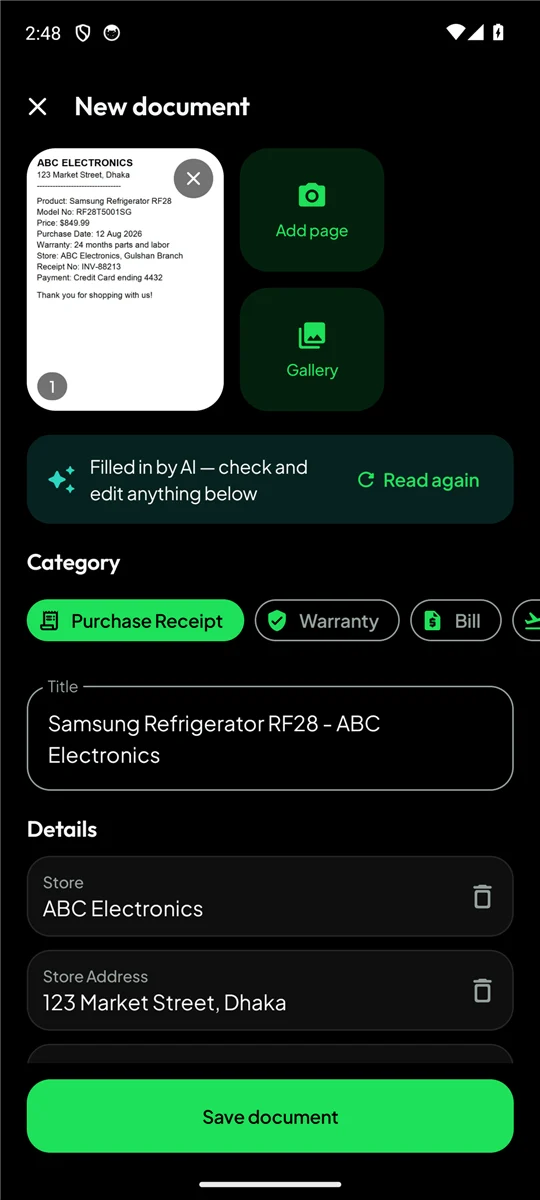
The details are filled in for you. Check them, change anything, and save.
Search anytime, get reminded before dates, and keep it backed up.
Memento sends your page photos to Google's Gemini AI through Firebase, which reads all the pages together — like a person skimming the document — and returns the details in a structured form.
Clear photos mean better answers.
Daylight or a bright room. Avoid harsh shadows and glare on glossy paper.
Keep all four corners visible so nothing important is cut off.
Lay the document flat and hold the phone parallel to it.
Add every page of the same document to one item — AI reads them together.
Blurry result? Retake the photo and tap “Read again”.
AI is very good, but always compare important numbers and dates with the original.
They're stored in Memento's private storage on your phone. They're sent to Gemini only to read them for you — never for advertising, and never to train models.
Memento is free on Google Play. Install it, snap your first receipt, and let it remember the rest.